# Text

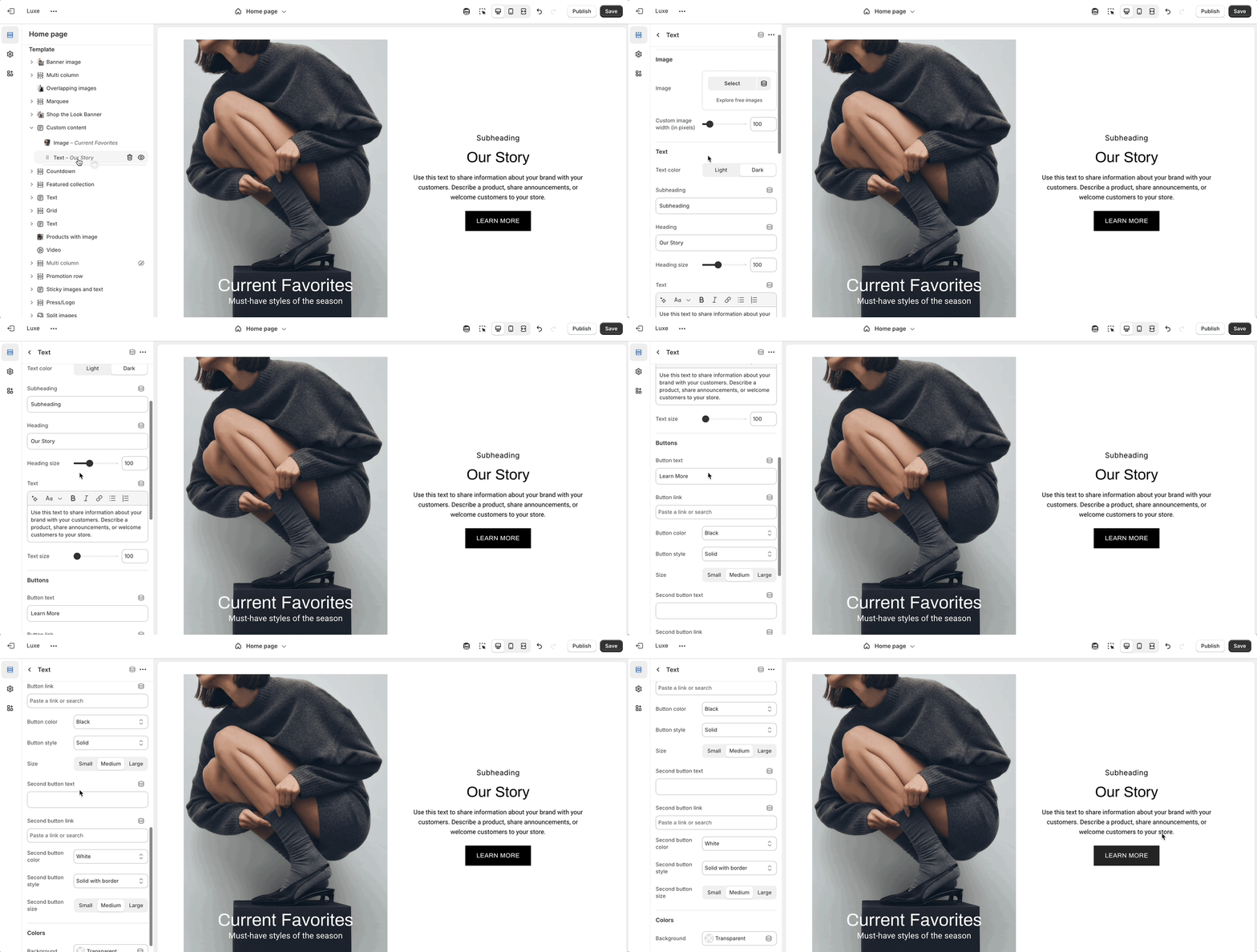
Presents rich text content with optional images and buttons for storytelling or announcements.

{% hint style="warning" %}
You can only choose two blocks to be shown at a time.
{% endhint %}

<figure><img src="https://891064830-files.gitbook.io/~/files/v0/b/gitbook-x-prod.appspot.com/o/spaces%2Fz8oqtXqtdhOM4CxRzekr%2Fuploads%2F31quRyTAm4fGExDBqrzM%2Ftext-block.gif?alt=media&#x26;token=00ea7d54-2d94-4434-8354-652388b061c4" alt=""><figcaption></figcaption></figure>

<table><thead><tr><th width="255.3134765625">Settings</th><th width="141.595703125" align="center">Type</th><th>Description</th></tr></thead><tbody><tr><td>Text position</td><td align="center"><code>select</code></td><td>Sets the placement of text relative to the image: <code>Left</code>, <code>Right</code>, or <code>Center</code>.</td></tr><tr><td><strong>Image</strong></td><td align="center"></td><td></td></tr><tr><td>Image</td><td align="center"><code>image_picker</code></td><td>Upload or choose an image to display alongside the text content.</td></tr><tr><td>Custom image width (in pixels)</td><td align="center"><code>range</code></td><td>Defines a custom width for the image in pixels for more precise layout control.</td></tr><tr><td><strong>Text</strong></td><td align="center"></td><td></td></tr><tr><td>Subheading</td><td align="center"><code>text</code></td><td>Adds a smaller heading or introductory line above the main heading.</td></tr><tr><td>Heading</td><td align="center"><code>text</code></td><td>Main title or attention-grabbing headline shown in the block.</td></tr><tr><td>Heading size</td><td align="center"><code>range</code></td><td>Adjusts the size of the heading text.</td></tr><tr><td>Text</td><td align="center"><code>richtext</code></td><td>Area for supporting or descriptive text content.</td></tr><tr><td>Text size</td><td align="center"><code>range</code></td><td>Controls the font size of the paragraph or body text.</td></tr><tr><td><strong>Buttons</strong></td><td align="center"></td><td></td></tr><tr><td>Button text</td><td align="center"><code>text</code></td><td>Label shown on the primary button.</td></tr><tr><td>Button link</td><td align="center"><code>url</code></td><td>URL that the primary button directs to when clicked.</td></tr><tr><td>Button color</td><td align="center"><code>select</code></td><td>Sets the color style for the primary button: <code>Primary</code>, <code>White</code>, <code>Black</code>, or <code>Secondary</code>.</td></tr><tr><td>Button style</td><td align="center"><code>select</code></td><td>Defines the visual treatment of the primary button: <code>Solid</code>, <code>Outline</code>, <code>Text</code> and etc.</td></tr><tr><td>Size</td><td align="center"><code>select</code></td><td>Controls the size of the primary button: <code>Small</code>, <code>Medium</code>, or <code>Large</code>.</td></tr><tr><td>Second button text</td><td align="center"><code>text</code></td><td>Label shown on the secondary button.</td></tr><tr><td>Second button link</td><td align="center"><code>url</code></td><td>URL that the secondary button will link to.</td></tr><tr><td>Second button color</td><td align="center"><code>select</code></td><td>Sets the color style for the secondary button.</td></tr><tr><td>Second button style</td><td align="center"><code>select</code></td><td>Defines the look of the secondary button: <code>Solid</code>, <code>Outline</code>, <code>Soft</code>, and etc.</td></tr><tr><td>Second button size</td><td align="center"><code>select</code></td><td>Sets the size for the secondary button: <code>Small</code>, <code>Medium</code>, or <code>Large</code>.</td></tr><tr><td><strong>Colors</strong></td><td align="center"></td><td></td></tr><tr><td>Background</td><td align="center"><code>color</code></td><td>Sets the background color of the entire block.</td></tr></tbody></table>